Building a Secure AI Agent Container for Production Workloads
A workflow-based container architecture for running AI agents in production clusters with strict sandboxing, no external tool access, and VPC-bounded outputs.
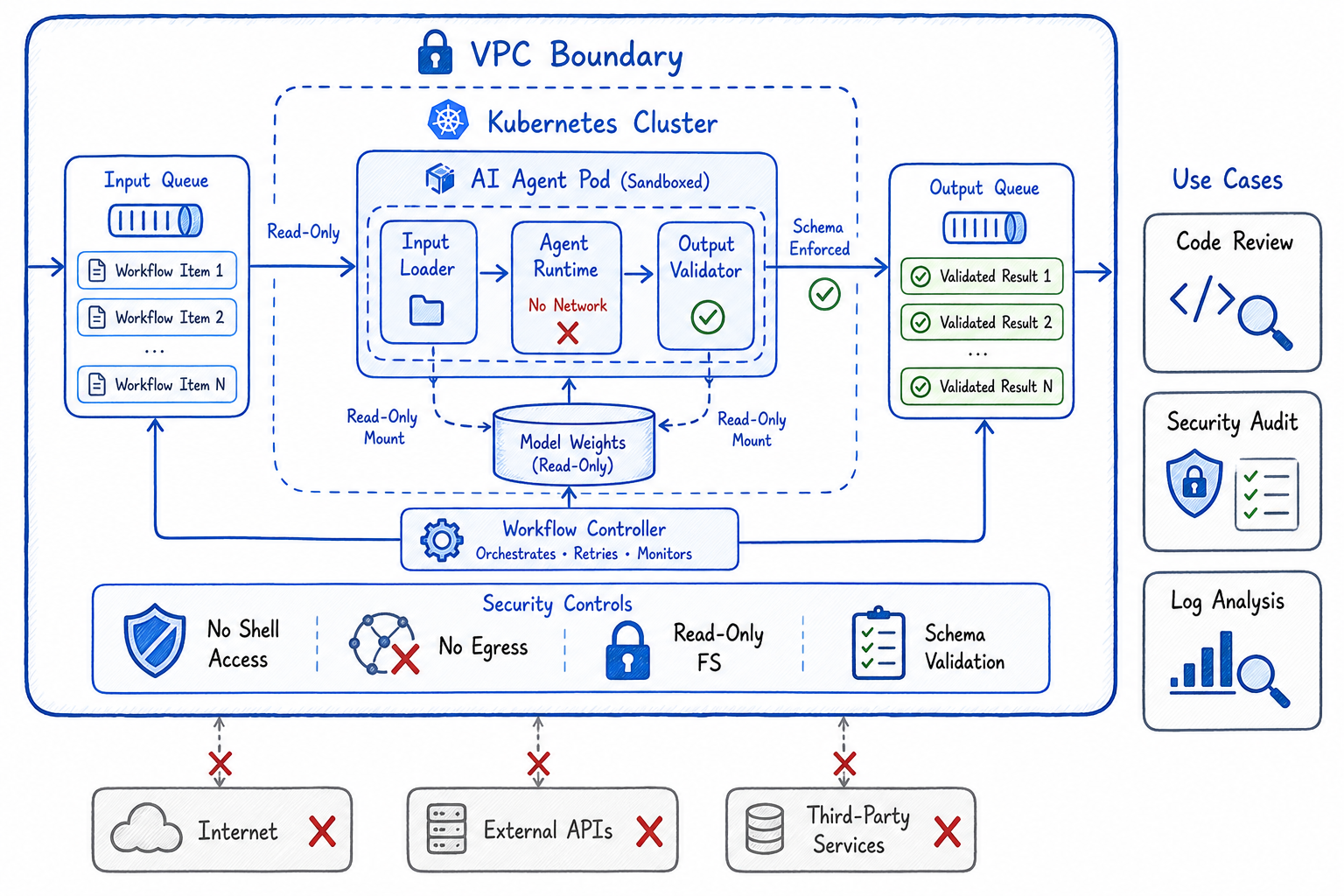
When you want AI agents to operate on production data — reviewing code, analyzing logs, auditing configurations — you face a fundamental tension: the agent needs access to sensitive data, but you can’t trust it with unrestricted capabilities. The solution isn’t to avoid production use cases; it’s to build a container architecture that makes unsafe operations impossible by design.
This post describes a workflow-based AI agent container that runs in production clusters with strict isolation: defined inputs, bounded outputs, no external tool access, and hard VPC boundaries. It’s the pattern I use for deploying agents that do code reviews, security audits, and data analysis on production systems.
The Problem: AI Agents in Production
Traditional AI agent architectures assume the agent can:
- Make HTTP requests to external services
- Execute arbitrary code
- Read and write to the filesystem
- Access environment variables and secrets
This works fine for development, but in production you need guarantees:
| Requirement | Why It Matters |
|---|---|
| No external network access | Prevent data exfiltration |
| No arbitrary code execution | Prevent supply chain attacks |
| Bounded inputs | Control what data the agent sees |
| Bounded outputs | Control what the agent can produce |
| Audit trail | Know exactly what happened |
The goal: an agent that can analyze production data and produce useful outputs, but physically cannot leak data or cause harm.
The Architecture: Workflow-Based Agent Container
┌─────────────────────────────────────────────────────────────────┐
│                        VPC Boundary                              │
│  ┌───────────────────────────────────────────────────────────┐  │
│  │                   Kubernetes Cluster                       │  │
│  │  ┌─────────────────────────────────────────────────────┐  │  │
│  │  │              AI Agent Pod (Sandboxed)                │  │  │
│  │  │  ┌─────────┐  ┌─────────┐  ┌─────────────────────┐  │  │  │
│  │  │  │ Input   │→ │ Agent   │→ │ Output Validator    │  │  │  │
│  │  │  │ Loader  │  │ Runtime │  │ (Schema Enforced)   │  │  │  │
│  │  │  └─────────┘  └─────────┘  └─────────────────────┘  │  │  │
│  │  │       ↑            ↓              ↓                  │  │  │
│  │  │  [Read-Only]  [No Network]  [Write to Queue Only]   │  │  │
│  │  └─────────────────────────────────────────────────────┘  │  │
│  │       ↑                                    ↓               │  │
│  │  ┌─────────┐                        ┌─────────────┐       │  │
│  │  │ Input   │                        │ Output      │       │  │
│  │  │ Queue   │                        │ Queue       │       │  │
│  │  └─────────┘                        └─────────────┘       │  │
│  └───────────────────────────────────────────────────────────┘  │
│                              ↑                    ↓              │
│                    [Workflow Trigger]    [Internal Consumer]    │
│                                                                  │
│  ╳ No egress to internet                                        │
│  ╳ No access to external APIs                                   │
│  ╳ No secrets in container                                      │
└─────────────────────────────────────────────────────────────────┘
Core Principles
- Workflow model: Inputs and outputs are explicitly defined schemas, not arbitrary data
- Read-only inputs: Agent receives data but cannot modify source systems
- No tool access: No shell, no HTTP client, no file writes outside designated paths
- VPC-bounded outputs: Results go to an internal queue, never external endpoints
- Schema validation: Outputs must match expected structure or are rejected
The Workflow Model
Every agent task is a workflow with explicit contracts:
# workflow-definition.yaml
apiVersion: agent.platform/v1
kind: AgentWorkflow
metadata:
  name: code-review
spec:
  input:
    schema:
      type: object
      required: [repository, pull_request_id, diff]
      properties:
        repository:
          type: string
          pattern: "^[a-z0-9-]+/[a-z0-9-]+$"
        pull_request_id:
          type: integer
        diff:
          type: string
          maxLength: 500000
        context_files:
          type: array
          items:
            type: object
            properties:
              path: { type: string }
              content: { type: string, maxLength: 100000 }
          maxItems: 50

  output:
    schema:
      type: object
      required: [review_status, comments]
      properties:
        review_status:
          type: string
          enum: [approved, changes_requested, needs_discussion]
        comments:
          type: array
          items:
            type: object
            required: [file, line, comment]
            properties:
              file: { type: string }
              line: { type: integer }
              comment: { type: string, maxLength: 2000 }
              severity: { type: string, enum: [info, warning, error] }
          maxItems: 100
        summary:
          type: string
          maxLength: 5000

  constraints:
    max_runtime_seconds: 300
    max_memory_mb: 2048
    network_policy: none
    filesystem: read-only
The workflow definition is the security contract. The agent cannot:
- Receive inputs that don’t match the schema
- Produce outputs that don’t match the schema
- Run longer than the timeout
- Use more memory than allocated
- Make any network calls
- Write to the filesystem
Container Implementation
Base Image: Minimal and Locked Down
# Dockerfile.agent
FROM python:3.11-slim AS base

# Remove unnecessary packages
RUN apt-get update && apt-get install -y --no-install-recommends \
    ca-certificates \
    && rm -rf /var/lib/apt/lists/* \
    && apt-get purge -y --auto-remove curl wget netcat-* \
    && rm -rf /usr/bin/nc /usr/bin/curl /usr/bin/wget

# Create non-root user
RUN useradd -r -u 1000 -g nogroup agent

# Install Python dependencies (no network tools)
COPY requirements.txt /app/
RUN pip install --no-cache-dir -r /app/requirements.txt \
    && pip uninstall -y pip setuptools \
    && rm -rf /root/.cache

# Copy agent code
COPY --chown=agent:nogroup agent/ /app/agent/

# Remove shell access
RUN rm -rf /bin/sh /bin/bash /bin/dash

USER agent
WORKDIR /app

# Read-only filesystem marker
LABEL security.readonly="true"

ENTRYPOINT ["python", "-m", "agent.main"]
Runtime: No Network, No Tools
# agent/runtime.py
import os
import sys
import json
import resource
from typing import Any
from dataclasses import dataclass
from jsonschema import validate, ValidationError

@dataclass
class WorkflowContext:
    workflow_id: str
    input_data: dict
    input_schema: dict
    output_schema: dict
    max_runtime_seconds: int

class SecureAgentRuntime:
    def __init__(self):
        self._verify_isolation()

    def _verify_isolation(self):
        """Verify the container is properly isolated before running."""
        checks = [
            self._check_no_network,
            self._check_readonly_fs,
            self._check_no_shell,
            self._check_resource_limits,
        ]
        for check in checks:
            if not check():
                raise SecurityError(f"Isolation check failed: {check.__name__}")

    def _check_no_network(self) -> bool:
        """Verify no network interfaces except loopback."""
        try:
            import socket
            socket.setdefaulttimeout(1)
            sock = socket.socket(socket.AF_INET, socket.SOCK_STREAM)
            sock.connect(("1.1.1.1", 80))
            sock.close()
            return False  # Connection succeeded = not isolated
        except (socket.timeout, OSError):
            return True  # Connection failed = isolated

    def _check_readonly_fs(self) -> bool:
        """Verify filesystem is read-only except designated output path."""
        test_paths = ["/tmp/test", "/app/test", "/home/test"]
        for path in test_paths:
            try:
                with open(path, "w") as f:
                    f.write("test")
                os.remove(path)
                return False  # Write succeeded = not isolated
            except (OSError, PermissionError):
                continue
        return True

    def _check_no_shell(self) -> bool:
        """Verify no shell access."""
        shells = ["/bin/sh", "/bin/bash", "/bin/dash", "/bin/zsh"]
        return not any(os.path.exists(s) for s in shells)

    def _check_resource_limits(self) -> bool:
        """Verify resource limits are set."""
        soft, hard = resource.getrlimit(resource.RLIMIT_AS)
        return hard < resource.RLIM_INFINITY

    def execute(self, ctx: WorkflowContext, agent_fn) -> dict:
        """Execute agent function with strict input/output validation."""
        # Validate input
        try:
            validate(instance=ctx.input_data, schema=ctx.input_schema)
        except ValidationError as e:
            raise InputValidationError(f"Input validation failed: {e.message}")

        # Set alarm for timeout
        import signal
        def timeout_handler(signum, frame):
            raise TimeoutError("Agent execution exceeded time limit")
        signal.signal(signal.SIGALRM, timeout_handler)
        signal.alarm(ctx.max_runtime_seconds)

        try:
            # Execute agent
            output = agent_fn(ctx.input_data)

            # Validate output
            validate(instance=output, schema=ctx.output_schema)

            return output
        except ValidationError as e:
            raise OutputValidationError(f"Output validation failed: {e.message}")
        finally:
            signal.alarm(0)
Agent Implementation: Pure Function
# agent/code_review.py
from typing import Any
import anthropic  # Pre-loaded model weights, no API calls

class CodeReviewAgent:
    def __init__(self, model_path: str):
        # Load local model weights - no network required
        self.model = self._load_local_model(model_path)

    def _load_local_model(self, path: str):
        """Load model from local filesystem (mounted read-only)."""
        # Model weights are baked into container or mounted as volume
        pass

    def review(self, input_data: dict) -> dict:
        """
        Pure function: takes input dict, returns output dict.
        No side effects, no network calls, no file writes.
        """
        diff = input_data["diff"]
        context_files = input_data.get("context_files", [])

        # Build prompt from input data only
        prompt = self._build_review_prompt(diff, context_files)

        # Run inference locally
        response = self.model.generate(prompt)

        # Parse response into structured output
        comments = self._parse_review_comments(response)
        status = self._determine_review_status(comments)
        summary = self._generate_summary(response)

        # Return schema-compliant output
        return {
            "review_status": status,
            "comments": comments[:100],  # Enforce max items
            "summary": summary[:5000],   # Enforce max length
        }

    def _build_review_prompt(self, diff: str, context: list) -> str:
        # Truncate inputs to prevent context overflow
        max_diff_chars = 100000
        truncated_diff = diff[:max_diff_chars]

        context_str = ""
        for file in context[:10]:  # Max 10 context files
            context_str += f"\n### {file['path']}\n```\n{file['content'][:20000]}\n```"

        return f"""Review this code change and provide feedback.

## Diff
```diff
{truncated_diff}
Context Files
{context_str}
Provide your review as structured feedback with file, line number, comment, and severity."""
## Kubernetes Deployment

### Pod Security: Maximum Isolation

```yaml
# agent-pod.yaml
apiVersion: v1
kind: Pod
metadata:
  name: code-review-agent
  labels:
    app: ai-agent
    workflow: code-review
spec:
  securityContext:
    runAsNonRoot: true
    runAsUser: 1000
    fsGroup: 1000
    seccompProfile:
      type: RuntimeDefault

  containers:
  - name: agent
    image: internal-registry.vpc/ai-agent:v1.2.3
    imagePullPolicy: Always

    securityContext:
      allowPrivilegeEscalation: false
      readOnlyRootFilesystem: true
      capabilities:
        drop: ["ALL"]

    resources:
      limits:
        memory: "2Gi"
        cpu: "2"
        nvidia.com/gpu: "1"  # If using local GPU inference
      requests:
        memory: "1Gi"
        cpu: "1"

    volumeMounts:
    - name: input
      mountPath: /input
      readOnly: true
    - name: output
      mountPath: /output
    - name: model-weights
      mountPath: /models
      readOnly: true
    - name: tmp
      mountPath: /tmp

    env:
    - name: WORKFLOW_ID
      valueFrom:
        fieldRef:
          fieldPath: metadata.annotations['workflow.id']

  volumes:
  - name: input
    configMap:
      name: agent-input-${WORKFLOW_ID}
  - name: output
    emptyDir:
      sizeLimit: 100Mi
  - name: model-weights
    persistentVolumeClaim:
      claimName: model-weights-pvc
      readOnly: true
  - name: tmp
    emptyDir:
      sizeLimit: 500Mi

  # No service account token
  automountServiceAccountToken: false

  # Strict DNS policy
  dnsPolicy: None
  dnsConfig:
    nameservers: []  # No DNS resolution

  # No host access
  hostNetwork: false
  hostPID: false
  hostIPC: false

  restartPolicy: Never
  activeDeadlineSeconds: 600
Network Policy: Zero Egress
# network-policy.yaml
apiVersion: networking.k8s.io/v1
kind: NetworkPolicy
metadata:
  name: ai-agent-isolation
  namespace: ai-agents
spec:
  podSelector:
    matchLabels:
      app: ai-agent
  policyTypes:
  - Ingress
  - Egress

  # Allow ingress only from workflow controller
  ingress:
  - from:
    - podSelector:
        matchLabels:
          app: workflow-controller
    ports:
    - port: 8080
      protocol: TCP

  # Allow egress only to internal result queue
  egress:
  - to:
    - podSelector:
        matchLabels:
          app: result-queue
    ports:
    - port: 5672
      protocol: TCP

  # Block everything else - no internet, no other pods
VPC-Level Controls
# terraform/vpc.tf

# Security group for AI agent nodes
resource "aws_security_group" "ai_agent_nodes" {
  name        = "ai-agent-nodes"
  description = "Security group for AI agent worker nodes"
  vpc_id      = aws_vpc.main.id

  # No inbound from internet
  # Only from internal load balancer
  ingress {
    from_port       = 443
    to_port         = 443
    protocol        = "tcp"
    security_groups = [aws_security_group.internal_lb.id]
  }

  # Egress only to internal services
  egress {
    from_port   = 5672
    to_port     = 5672
    protocol    = "tcp"
    cidr_blocks = [aws_subnet.internal.cidr_block]
    description = "Result queue"
  }

  egress {
    from_port   = 443
    to_port     = 443
    protocol    = "tcp"
    cidr_blocks = [aws_subnet.internal.cidr_block]
    description = "Internal container registry"
  }

  # Explicit deny of internet egress
  # (Implicit in AWS, but documented for clarity)

  tags = {
    Name        = "ai-agent-nodes"
    Environment = "production"
    Purpose     = "isolated-ai-workloads"
  }
}

# VPC endpoint for internal services (no internet gateway needed)
resource "aws_vpc_endpoint" "ecr" {
  vpc_id              = aws_vpc.main.id
  service_name        = "com.amazonaws.${var.region}.ecr.dkr"
  vpc_endpoint_type   = "Interface"
  subnet_ids          = [aws_subnet.internal.id]
  security_group_ids  = [aws_security_group.vpc_endpoints.id]
  private_dns_enabled = true
}
Workflow Orchestration
Triggering Agent Jobs
# workflow/controller.py
from kubernetes import client, config
from dataclasses import dataclass
import json
import uuid

@dataclass
class WorkflowRequest:
    workflow_type: str
    input_data: dict
    callback_queue: str

class WorkflowController:
    def __init__(self):
        config.load_incluster_config()
        self.batch_v1 = client.BatchV1Api()
        self.core_v1 = client.CoreV1Api()

    def submit(self, request: WorkflowRequest) -> str:
        """Submit a workflow for execution."""
        workflow_id = str(uuid.uuid4())

        # Create input ConfigMap
        self._create_input_configmap(workflow_id, request.input_data)

        # Create Job
        job = self._create_agent_job(workflow_id, request)

        return workflow_id

    def _create_input_configmap(self, workflow_id: str, input_data: dict):
        """Create ConfigMap with validated input data."""
        configmap = client.V1ConfigMap(
            metadata=client.V1ObjectMeta(
                name=f"agent-input-{workflow_id}",
                namespace="ai-agents",
                labels={"workflow-id": workflow_id},
            ),
            data={"input.json": json.dumps(input_data)},
        )
        self.core_v1.create_namespaced_config_map("ai-agents", configmap)

    def _create_agent_job(self, workflow_id: str, request: WorkflowRequest):
        """Create Kubernetes Job for agent execution."""
        job = client.V1Job(
            metadata=client.V1ObjectMeta(
                name=f"agent-{workflow_id}",
                namespace="ai-agents",
                annotations={"workflow.id": workflow_id},
            ),
            spec=client.V1JobSpec(
                ttl_seconds_after_finished=3600,
                backoff_limit=0,  # No retries
                active_deadline_seconds=600,
                template=self._get_pod_template(workflow_id, request),
            ),
        )
        return self.batch_v1.create_namespaced_job("ai-agents", job)
Consuming Results
# workflow/consumer.py
import pika
import json
from jsonschema import validate

class ResultConsumer:
    def __init__(self, queue_host: str):
        self.connection = pika.BlockingConnection(
            pika.ConnectionParameters(host=queue_host)
        )
        self.channel = self.connection.channel()

    def consume(self, workflow_id: str, output_schema: dict) -> dict:
        """Consume and validate result from agent."""
        result = self._get_result(workflow_id)

        # Validate against schema before accepting
        try:
            validate(instance=result, schema=output_schema)
        except Exception as e:
            raise InvalidOutputError(f"Agent output failed validation: {e}")

        # Additional safety checks
        self._check_no_embedded_code(result)
        self._check_no_urls(result)
        self._check_size_limits(result)

        return result

    def _check_no_embedded_code(self, result: dict):
        """Ensure output doesn't contain executable code patterns."""
        dangerous_patterns = [
            "eval(", "exec(", "import os", "subprocess",
            "<script>", "javascript:", "data:text/html",
        ]
        result_str = json.dumps(result)
        for pattern in dangerous_patterns:
            if pattern in result_str:
                raise SecurityError(f"Output contains forbidden pattern: {pattern}")

    def _check_no_urls(self, result: dict):
        """Ensure output doesn't contain external URLs."""
        import re
        result_str = json.dumps(result)
        url_pattern = r'https?://(?!internal\.)[^\s"\']+'
        if re.search(url_pattern, result_str):
            raise SecurityError("Output contains external URL")
Use Cases
1. Code Review Agent
# Workflow: Automated PR review
input:
  - PR diff
  - Related files (read-only)
  - Coding standards doc

output:
  - Review comments (file, line, message)
  - Approval status
  - Summary

constraints:
  - Cannot push to repository
  - Cannot access secrets
  - Cannot call external APIs
  - Output posted by separate service
2. Security Audit Agent
# Workflow: Infrastructure security scan
input:
  - Terraform configs
  - Kubernetes manifests
  - IAM policies

output:
  - Findings (resource, severity, recommendation)
  - Compliance status
  - Risk score

constraints:
  - Read-only access to configs
  - Cannot modify infrastructure
  - Cannot exfiltrate data
3. Log Analysis Agent
# Workflow: Incident investigation
input:
  - Log snippets (pre-filtered, no PII)
  - Error patterns
  - System topology

output:
  - Root cause hypothesis
  - Affected components
  - Recommended actions

constraints:
  - Logs pre-sanitized before input
  - Cannot access raw log storage
  - Output reviewed before action
Audit and Compliance
Every workflow execution produces an immutable audit record:
{
  "workflow_id": "a1b2c3d4-e5f6-7890-abcd-ef1234567890",
  "workflow_type": "code-review",
  "timestamp": "2026-04-08T14:32:01Z",
  "input_hash": "sha256:abc123...",
  "output_hash": "sha256:def456...",
  "execution_duration_ms": 45230,
  "container_image": "internal-registry.vpc/ai-agent@sha256:789...",
  "isolation_verified": true,
  "schema_validation": {
    "input": "passed",
    "output": "passed"
  },
  "resource_usage": {
    "peak_memory_mb": 1847,
    "cpu_seconds": 38.2
  }
}
Key Takeaways
Building secure AI agent containers for production requires:
- Workflow model: Explicit input/output schemas as security contracts
- Defense in depth: Container hardening + Kubernetes policies + VPC controls
- Zero trust for agents: Assume the agent will try to escape; make it impossible
- Validation everywhere: Inputs validated before execution, outputs validated before consumption
- Audit everything: Immutable records of every execution
This architecture lets you run AI agents on production data with confidence. The agent can analyze code, review configurations, and investigate incidents — but it physically cannot leak data, execute arbitrary code, or reach external systems.
The tradeoff is flexibility. Agents can’t browse the web, install packages, or call APIs. But for production use cases like code review, that’s exactly what you want: a powerful analyzer with no hands.
Building secure AI infrastructure for your organization? Connect on LinkedIn.