MCP Server Patterns for Enterprise
How Model Context Protocol changes agent architectures and what platform teams need to provide.
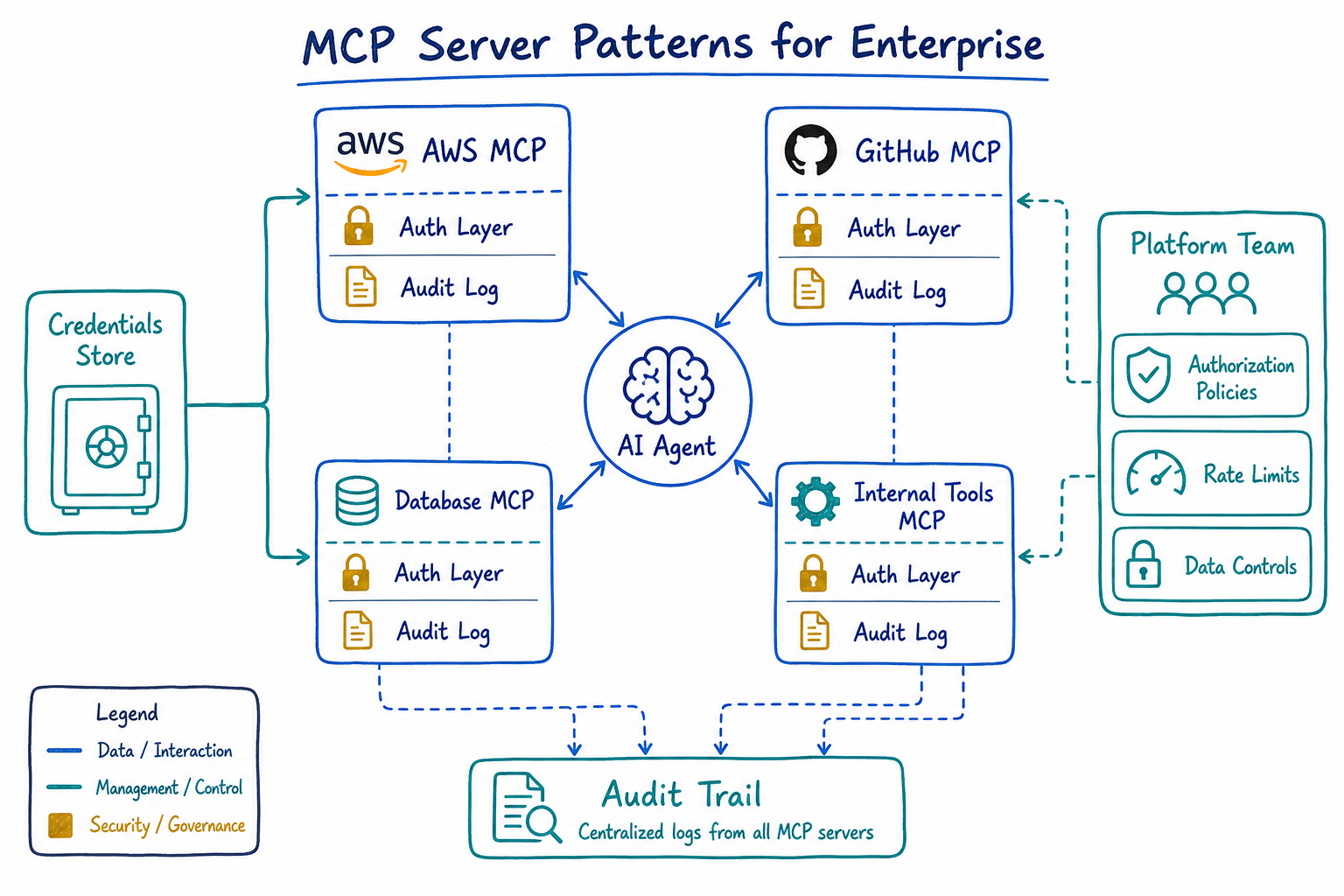
Over the past year, I’ve watched Model Context Protocol (MCP) go from an interesting spec to a critical piece of our AI infrastructure. As a platform engineer, I’ve had to rethink how we expose internal tools and data to AI agents—and MCP has become the answer to problems I didn’t know how to solve six months ago.
What is MCP and Why It Matters
Model Context Protocol is an open standard that defines how AI models interact with external tools and data sources. Think of it as a USB-C port for AI agents: a standardized interface that lets any compliant model connect to any compliant tool server.
Before MCP, every AI integration was bespoke. If you wanted Claude to query your internal database, you’d build a custom integration. If you wanted GPT-4 to access your ticketing system, that was another custom integration. Each one had its own authentication model, its own error handling, its own way of describing capabilities.
MCP changes this by providing:
- Standardized tool discovery: Agents can query what tools are available
- Uniform invocation patterns: One way to call tools, regardless of what they do
- Consistent authentication flows: OAuth, API keys, and other auth methods work the same way
- Structured responses: Tools return data in predictable formats
For platform teams, this means we can build infrastructure once and have it work with any MCP-compliant AI system.
The Shift from Monolithic Agents to Tool-Augmented Architectures
The old model of AI agents was monolithic: train a model with all the knowledge it needs, deploy it, and hope it doesn’t hallucinate. This approach hit a wall quickly in enterprise settings where data changes constantly and proprietary knowledge can’t be baked into model weights.
Tool-augmented architectures flip this model. The AI becomes an orchestration layer that:
- Understands user intent
- Discovers relevant tools via MCP
- Calls those tools to gather real data
- Synthesizes responses from actual system state
Here’s what this looks like in practice:
{
  "mcpServers": {
    "internal-jira": {
      "command": "npx",
      "args": ["-y", "@company/mcp-jira-server"],
      "env": {
        "JIRA_INSTANCE": "https://company.atlassian.net",
        "JIRA_AUTH_METHOD": "oauth2"
      }
    },
    "datadog-metrics": {
      "command": "npx",
      "args": ["-y", "@company/mcp-datadog-server"],
      "env": {
        "DD_SITE": "datadoghq.com"
      }
    },
    "internal-wiki": {
      "command": "npx",
      "args": ["-y", "@company/mcp-confluence-server"]
    }
  }
}
Now an engineer can ask “What’s the P95 latency for the checkout service and are there any related Jira tickets?” and get a real answer assembled from live data, not a hallucinated guess.
Enterprise MCP Patterns: Authentication, Authorization, Audit
Enterprise deployments can’t just expose tools to AI agents without controls. We need the same security primitives we’d apply to any API: authentication, authorization, and audit logging.
Authentication
MCP servers need to verify that the calling agent is legitimate. We’ve settled on a pattern where the MCP server validates a service token, then uses delegated credentials to access backend systems on behalf of the user:
{
  "mcpServers": {
    "secure-database": {
      "command": "node",
      "args": ["/opt/mcp-servers/database-server.js"],
      "env": {
        "MCP_AUTH_MODE": "delegated",
        "OIDC_ISSUER": "https://auth.company.com",
        "OIDC_AUDIENCE": "mcp-database-server",
        "USER_CONTEXT_HEADER": "X-User-Context"
      }
    }
  }
}
The agent passes along user context, and the MCP server validates it against our identity provider before executing any queries.
Authorization
Not every user should access every tool. We implement authorization at two levels:
- Tool visibility: Users only see tools they’re permitted to use
- Operation scoping: Even visible tools may have restricted operations
{
  "authorization": {
    "policy_engine": "opa",
    "policy_bundle": "s3://company-policies/mcp-authz/bundle.tar.gz",
    "default_deny": true,
    "rules": [
      {
        "tool": "database-query",
        "allowed_groups": ["data-engineers", "analysts"],
        "allowed_operations": ["read"],
        "row_limit": 10000
      },
      {
        "tool": "deployment-trigger",
        "allowed_groups": ["sre-oncall"],
        "require_approval": true,
        "approval_channel": "#deploy-approvals"
      }
    ]
  }
}
Audit Logging
Every tool invocation gets logged. This isn’t optional in regulated environments. Our MCP servers emit structured logs that feed into our SIEM:
{
  "timestamp": "2025-07-18T14:32:01Z",
  "event_type": "mcp_tool_invocation",
  "tool_name": "database-query",
  "user_id": "engineer@company.com",
  "agent_session": "sess_abc123",
  "input_hash": "sha256:e3b0c44...",
  "output_size_bytes": 4521,
  "latency_ms": 234,
  "authorization_decision": "allow",
  "policy_version": "v2.3.1"
}
We hash inputs rather than logging them directly to avoid accidentally persisting sensitive data in logs while still maintaining traceability.
Building Internal MCP Servers for Proprietary Tools and Data
Most enterprises have internal systems that will never have public MCP servers. Building your own is straightforward once you understand the pattern.
An MCP server is essentially a JSON-RPC endpoint that implements a few key methods:
tools/list: Return available tools and their schemastools/call: Execute a tool and return resultsresources/list: Expose data resources the agent can readprompts/list: Provide templated prompts for common tasks
Here’s a skeleton for an internal MCP server:
{
  "name": "@company/mcp-inventory-server",
  "version": "1.0.0",
  "mcp": {
    "tools": [
      {
        "name": "check-inventory",
        "description": "Check current inventory levels for a SKU",
        "inputSchema": {
          "type": "object",
          "properties": {
            "sku": {
              "type": "string",
              "description": "Product SKU to check"
            },
            "warehouse": {
              "type": "string",
              "enum": ["us-east", "us-west", "eu-central"],
              "description": "Warehouse location"
            }
          },
          "required": ["sku"]
        }
      },
      {
        "name": "reserve-inventory",
        "description": "Reserve inventory for an order",
        "inputSchema": {
          "type": "object",
          "properties": {
            "sku": { "type": "string" },
            "quantity": { "type": "integer", "minimum": 1 },
            "order_id": { "type": "string" }
          },
          "required": ["sku", "quantity", "order_id"]
        }
      }
    ]
  }
}
The key is writing good descriptions. AI agents use these descriptions to decide when to call your tool. Vague descriptions lead to tools being used incorrectly or not at all.
Credential Management for MCP Servers
Credentials are where MCP deployments get complicated. MCP servers need access to backend systems, but we can’t just embed secrets in config files.
Our pattern uses a combination of:
- Short-lived credentials fetched at runtime from a secrets manager
- Instance identity for cloud-native authentication where possible
- Credential caching with automatic refresh
{
  "mcpServers": {
    "production-database": {
      "command": "node",
      "args": ["/opt/mcp-servers/database-server.js"],
      "env": {
        "CREDENTIAL_PROVIDER": "aws-secrets-manager",
        "SECRET_ARN": "arn:aws:secretsmanager:us-east-1:123456789:secret:mcp/prod-db",
        "CREDENTIAL_REFRESH_SECONDS": 3600,
        "USE_IAM_AUTH": "true"
      }
    }
  }
}
For development environments, we use a different pattern that allows engineers to use their own credentials:
{
  "mcpServers": {
    "dev-database": {
      "command": "node",
      "args": ["/opt/mcp-servers/database-server.js"],
      "env": {
        "CREDENTIAL_PROVIDER": "keychain",
        "KEYCHAIN_SERVICE": "mcp-dev-database",
        "FALLBACK_TO_SSO": "true"
      }
    }
  }
}
Security Considerations
MCP servers are attack surface. They sit between AI agents (which process untrusted user input) and your backend systems. This requires careful security design.
Network Isolation
MCP servers should run in isolated network segments with explicit allowlists for backend connectivity:
{
  "network_policy": {
    "mcp_server_segment": "10.100.0.0/24",
    "allowed_egress": [
      {
        "destination": "database.internal.company.com",
        "port": 5432,
        "protocol": "tcp"
      },
      {
        "destination": "api.internal.company.com",
        "port": 443,
        "protocol": "tcp"
      }
    ],
    "denied_egress": ["0.0.0.0/0"],
    "ingress_sources": ["ai-agent-pool"]
  }
}
Data Exposure Controls
AI agents will try to access whatever data they think will help answer a question. MCP servers must enforce data exposure limits:
- Row limits on database queries
- Column redaction for sensitive fields (SSN, salary, etc.)
- Time bounds on data access (no queries older than X days without explicit permission)
- Aggregation enforcement (return counts, not individual records for certain queries)
{
  "data_controls": {
    "pii_columns": ["ssn", "salary", "home_address", "phone_number"],
    "pii_action": "redact",
    "max_rows_per_query": 1000,
    "require_aggregation_for": ["employee_compensation", "customer_orders"],
    "time_bound_tables": {
      "audit_logs": "30d",
      "user_activity": "7d"
    }
  }
}
Input Validation
Never trust input from AI agents. They’re processing user prompts that could be crafted to exploit your tools:
- Validate all inputs against strict schemas
- Reject unexpected fields
- Use parameterized queries for any database access
- Rate limit by user and session
Platform Team Responsibilities for MCP Infrastructure
If you’re on a platform team, MCP infrastructure is becoming your responsibility. Here’s what we’ve found ourselves owning:
MCP Server Registry
Teams need to discover what MCP servers are available. We built an internal registry that:
- Lists all approved MCP servers
- Shows capability descriptions
- Documents required permissions
- Provides example configurations
Golden Path Templates
Don’t let every team build MCP servers from scratch. Provide templates that include:
- Authentication boilerplate
- Audit logging
- Error handling
- Health checks
- Metrics emission
Centralized Credential Management
MCP servers across the org shouldn’t each solve credential management independently. Provide a standard credential provider that teams plug into.
Monitoring and Alerting
MCP servers need observability:
- Request latency and error rates
- Authorization denials (potential abuse indicator)
- Unusual access patterns
- Backend dependency health
Security Review Process
New MCP servers should go through security review before production deployment. We require:
- Threat model document
- Data classification of exposed information
- Access control matrix
- Incident response plan
Where This Is Heading
MCP is still early. The spec is evolving, tooling is maturing, and best practices are being discovered through trial and error. But the direction is clear: AI agents will interact with enterprise systems through standardized protocols, and platform teams will be responsible for making that interaction secure and reliable.
The organizations that build solid MCP infrastructure now will have a significant advantage as AI capabilities expand. Those still doing bespoke integrations for every AI tool will find themselves in integration debt that compounds with every new model and every new use case.
Start building your MCP platform today. Your future self will thank you.