FinOps for AI/ML Workloads: Mastering Cost Management in the Age of Generative AI
Inference economics, token-based billing, and cost attribution by team and project for AI workloads.
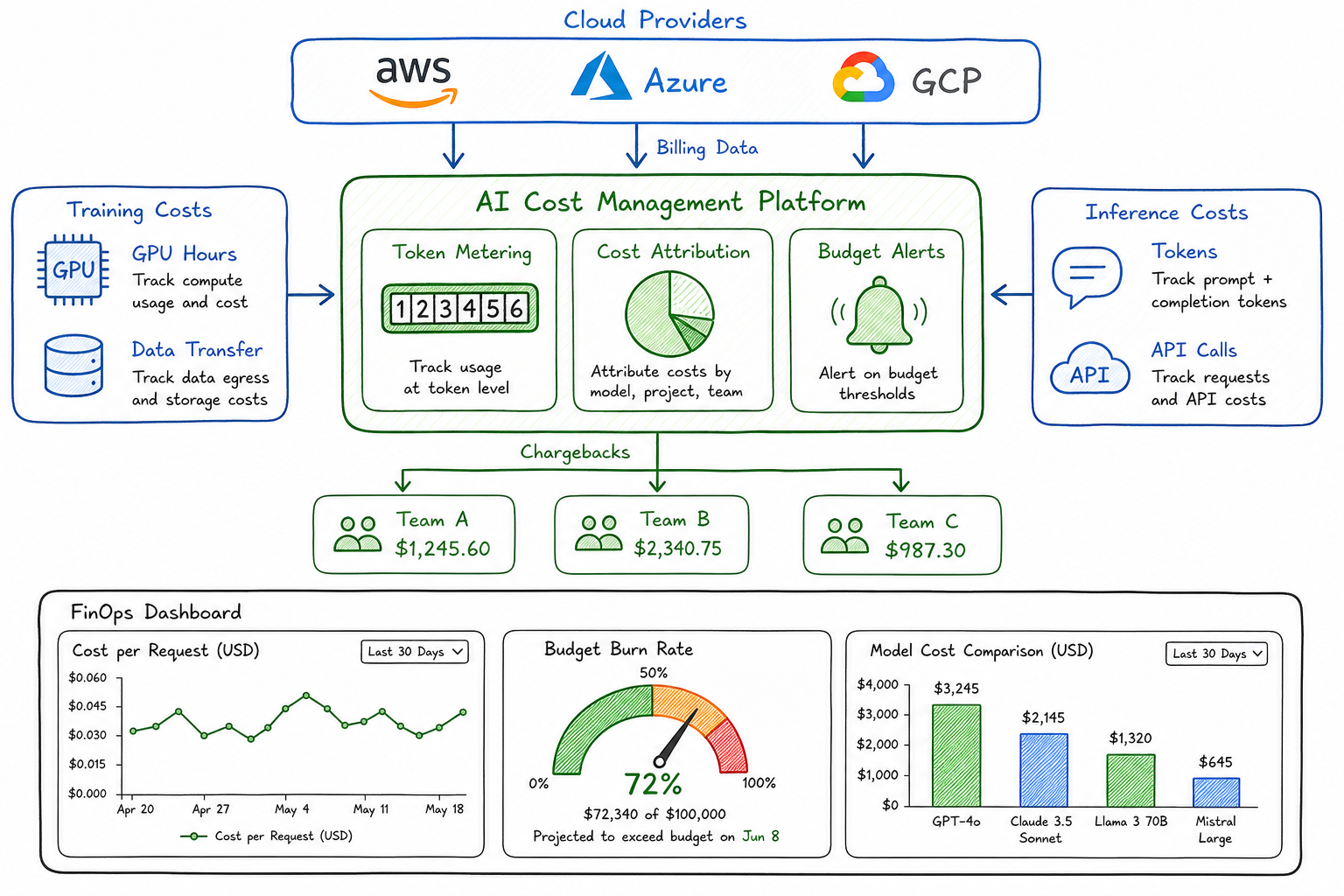
The explosion of AI and machine learning workloads has fundamentally changed how I think about cloud cost management. As a platform architect who has spent years optimizing Kubernetes clusters and traditional compute, nothing prepared me for the day our team deployed their first large language model in production. Within a week, our AI inference costs exceeded our entire monthly Kubernetes budget.
That experience taught me a hard lesson: traditional FinOps practices, while essential, are not sufficient for AI workloads. The cost dynamics, billing models, and optimization strategies are fundamentally different. This post captures what I’ve learned building cost-efficient AI platforms.
How AI Costs Differ from Traditional Cloud Costs
Traditional cloud costs are relatively predictable. You provision a VM, it runs for an hour, you pay for that hour. Storage costs are linear with capacity. Network costs scale with egress. The math is straightforward.
AI workloads break this model in several ways:
| Dimension | Traditional Workloads | AI/ML Workloads |
|---|---|---|
| Cost Driver | Compute hours, storage GB | Tokens, GPU hours, model parameters |
| Predictability | High - linear scaling | Low - depends on prompt length, model choice |
| Idle Cost | Low - can scale to zero | High - models need to stay warm |
| Scaling Pattern | Horizontal, gradual | Bursty, often vertical |
| Attribution | Clear - per service | Complex - shared models, API pools |
| Optimization | Right-sizing, scheduling | Caching, batching, model selection |
The fundamental difference is that AI costs are demand-driven in ways traditional compute is not. A single user request might consume 100 tokens or 10,000 tokens depending on the prompt and response. The same “inference” operation can cost anywhere from $0.0001 to $0.10 depending on the model and context length.
Token-Based Pricing Models and Their Implications
When I first encountered token-based pricing, I underestimated its complexity. Let me break down what I’ve learned.
Understanding Token Economics
Most LLM providers charge per token, with different rates for input and output:
| Provider/Model | Input Cost (per 1M tokens) | Output Cost (per 1M tokens) |
|---|---|---|
| GPT-4 Turbo | $10.00 | $30.00 |
| GPT-3.5 Turbo | $0.50 | $1.50 |
| Claude 3 Opus | $15.00 | $75.00 |
| Claude 3 Sonnet | $3.00 | $15.00 |
| Claude 3 Haiku | $0.25 | $1.25 |
| Llama 3 70B (self-hosted) | ~$2.00* | ~$2.00* |
*Self-hosted costs vary based on infrastructure and utilization
The 3:1 to 5:1 ratio between output and input costs caught me off guard initially. This means a chatbot that generates long responses costs significantly more than one that generates concise answers, even with identical input.
Hidden Cost Multipliers
What the pricing tables don’t show:
- System prompts count as input tokens - A 2,000 token system prompt repeated across 10,000 requests costs $20 on GPT-4 Turbo, before any user interaction
- Conversation history accumulates - Multi-turn conversations resend the entire history, creating exponential token growth
- Retry logic multiplies costs - Failed requests that retry still incur charges for tokens processed before the failure
- Embeddings add up - RAG pipelines often embed documents multiple times across different indices
I now track a metric I call “effective token cost” - the total tokens consumed divided by successful user interactions. This number is often 3-5x higher than naive calculations suggest.
Training vs Inference Cost Profiles
One of the biggest misconceptions I encounter is teams budgeting primarily for training when inference often dominates production costs.
Training Costs: Large but Finite
Training a model is expensive but bounded:
| Model Size | Approximate Training Cost | Training Time |
|---|---|---|
| Fine-tuned 7B | $500 - $2,000 | 2-8 hours |
| Fine-tuned 13B | $2,000 - $8,000 | 8-24 hours |
| Fine-tuned 70B | $15,000 - $50,000 | 2-7 days |
| Pre-training (small) | $100,000+ | Weeks |
Training is a capital expense - you pay once (per version) and amortize over the model’s useful life.
Inference Costs: Small but Unbounded
Inference costs are operational and scale with usage:
Monthly inference cost = requests × avg_tokens × cost_per_tokenFor a production application:
- 100,000 daily active users
- 10 requests per user per day
- 500 average tokens per request (input + output)
- $0.03 per 1K tokens (blended rate)
Monthly cost: 100,000 × 10 × 30 × 500 × $0.00003 = $450,000
This is why I tell teams: budget 10% for training, 90% for inference, and you’ll still probably underestimate inference.
The GPU Utilization Challenge
For self-hosted models, GPU utilization is the key metric. Unlike CPUs that efficiently handle varied workloads, GPUs are optimized for batch processing:
| Utilization | Cost Efficiency | Typical Scenario |
|---|---|---|
| < 20% | Poor | Low-traffic API, cold models |
| 20-50% | Moderate | Variable traffic, some batching |
| 50-70% | Good | Consistent traffic, effective batching |
| > 70% | Excellent | High traffic, optimized batching |
I’ve seen teams pay for 8 A100 GPUs at $25/hour each ($144,000/month) while maintaining only 15% utilization. Moving to a smaller deployment with better batching cut costs by 70%.
Cost Attribution Challenges
Traditional cost attribution relies on tagging resources and mapping them to cost centers. AI workloads break this model in several ways.
Shared Model Infrastructure
When multiple teams use the same deployed model, how do you attribute costs?
Scenario: A centralized LLM gateway serves requests from Product, Support, and Engineering teams using the same GPT-4 deployment.
Options I’ve implemented:
- Token-based attribution - Track tokens consumed per team/project via API gateway logs
- Request-based attribution - Simpler but ignores that a 10-token request costs differently than a 10,000-token request
- Model-weighted attribution - Apply different rates based on model tier used
My recommendation: implement token-level tracking from day one. It’s much harder to retrofit.
API Pool Complexity
Many organizations use shared API keys across teams, making attribution nearly impossible without additional instrumentation:
Request → API Gateway → OpenAI API
              ↓
         Log: team_id, model, input_tokens, output_tokens, timestamp
I require every AI request to include metadata:
- Team identifier
- Project/application identifier
- Request type (interactive, batch, background)
- User tier (if applicable for showback)
Embedding and RAG Attribution
RAG pipelines create a particularly thorny attribution problem:
- Team A creates and embeds a knowledge base ($50)
- Team B queries against it 100,000 times ($500)
- Team C adds documents to it, triggering re-embedding ($75)
Who pays for what? I’ve settled on:
- Embedding costs: attributed to the team that triggers them
- Query costs: attributed to the querying team
- Shared index maintenance: split by usage proportion
Implementing Chargebacks for AI Usage
Chargebacks drive accountability. Here’s how I implement them for AI workloads.
Chargeback Model Design
| Cost Component | Attribution Method | Frequency |
|---|---|---|
| API tokens (external) | Direct by team | Real-time |
| GPU hours (self-hosted) | Proportional by usage | Daily |
| Storage (models, embeddings) | Direct ownership | Monthly |
| Shared infrastructure | Fixed allocation + usage | Monthly |
Implementation Architecture
┌─────────────────────────────────────────────────────────────┐
│                    AI Gateway / Proxy                        │
├─────────────────────────────────────────────────────────────┤
│  • Intercepts all AI API calls                              │
│  • Extracts team/project metadata                           │
│  • Logs token counts, latency, model used                   │
│  • Enforces quotas and rate limits                          │
└─────────────────────────────────────────────────────────────┘
                              │
                              ▼
┌─────────────────────────────────────────────────────────────┐
│                    Cost Attribution Engine                   │
├─────────────────────────────────────────────────────────────┤
│  • Aggregates usage by team/project/model                   │
│  • Applies pricing tiers and discounts                      │
│  • Calculates blended rates for self-hosted                 │
│  • Generates chargeback reports                             │
└─────────────────────────────────────────────────────────────┘
                              │
                              ▼
┌─────────────────────────────────────────────────────────────┐
│                    Financial Systems                         │
├─────────────────────────────────────────────────────────────┤
│  • Showback dashboards per team                             │
│  • Budget vs actual tracking                                │
│  • Anomaly alerts                                           │
│  • Monthly chargeback reconciliation                        │
└─────────────────────────────────────────────────────────────┘
Rate Card Example
I publish a rate card so teams can estimate costs before building:
| Service | Unit | Internal Rate | Notes |
|---|---|---|---|
| GPT-4 Turbo | 1K tokens | $0.04 | Blended input/output |
| GPT-3.5 Turbo | 1K tokens | $0.002 | Blended input/output |
| Self-hosted Llama 70B | 1K tokens | $0.005 | Includes infrastructure |
| Embedding (ada-002) | 1K tokens | $0.0001 | Input only |
| Vector search | 1K queries | $0.10 | Pinecone-based |
| Fine-tuning | GPU-hour | $8.00 | A100 equivalent |
Optimization Strategies
After tracking costs rigorously, here are the strategies that have delivered the biggest impact.
1. Semantic Caching
Caching exact matches is obvious. Semantic caching extends this to similar queries:
Query: "What is the capital of France?"
Cached: "What's France's capital city?"
→ Return cached response (similarity > 0.95)
Impact: 20-40% reduction in API calls for customer support use cases where questions cluster around common topics.
Implementation considerations:
- Embedding cost for cache lookup (usually negligible)
- Cache invalidation for time-sensitive content
- Privacy implications of caching user queries
2. Intelligent Batching
Instead of processing requests individually, batch them:
| Approach | Latency | Cost | Best For |
|---|---|---|---|
| Synchronous (1:1) | Low | High | Interactive chat |
| Micro-batching (50ms window) | Medium | Medium | Near real-time |
| Batch processing | High | Low | Background jobs |
For self-hosted models, batching dramatically improves GPU utilization. I’ve seen throughput increase 4x with proper batching while maintaining acceptable latency.
3. Model Selection and Routing
Not every request needs GPT-4. I implement tiered routing:
┌─────────────────┐
│  Incoming       │
│  Request        │
└────────┬────────┘
         │
         ▼
┌─────────────────┐     Simple queries
│  Complexity     │────────────────────▶ GPT-3.5 / Haiku
│  Classifier     │                      ($0.002/1K)
└────────┬────────┘
         │ Complex queries
         ▼
┌─────────────────┐     Needs reasoning
│  Task Router    │────────────────────▶ GPT-4 / Sonnet
│                 │                      ($0.04/1K)
└────────┬────────┘
         │ Needs expertise
         ▼
┌─────────────────┐
│  Domain Model   │────────────────────▶ Fine-tuned specialist
│                 │                      ($0.01/1K)
└─────────────────┘
Impact: 60-70% cost reduction with minimal quality impact when the classifier is well-tuned.
4. Prompt Optimization
Shorter prompts cost less. I’ve seen teams reduce token usage by 50% through:
- Removing redundant instructions
- Using concise system prompts
- Implementing few-shot examples efficiently
- Compressing conversation history
Before optimization: 2,500 tokens average per request After optimization: 1,100 tokens average per request Annual savings at scale: ~$200,000
5. Response Length Control
Since output tokens cost 3-5x more than input tokens:
- Set explicit
max_tokenslimits - Include “be concise” in system prompts
- Use structured output formats (JSON) to reduce verbosity
- Post-process to truncate unnecessary content
6. Off-Peak Scheduling
For batch workloads, schedule during off-peak hours when self-hosted GPUs have capacity, or when spot instance prices are lower:
| Time Window | GPU Spot Price (typical) | Recommendation |
|---|---|---|
| Business hours | $2.50/hour | Interactive only |
| Evening | $1.80/hour | Batch processing |
| Night/Weekend | $1.20/hour | Training, large batches |
Building Cost Dashboards for AI Workloads
Visibility drives optimization. Here’s what I include in AI cost dashboards.
Executive Dashboard
| Metric | Purpose |
|---|---|
| Total AI spend (MTD) | Budget tracking |
| Cost per user interaction | Unit economics |
| Trend vs previous month | Growth tracking |
| Top 5 cost drivers | Focus optimization |
| Budget burn rate | Runway estimation |
Engineering Dashboard
| Metric | Purpose |
|---|---|
| Cost by model | Model selection decisions |
| Cost by team/project | Attribution and accountability |
| Token efficiency (output/input ratio) | Prompt optimization |
| Cache hit rate | Caching effectiveness |
| GPU utilization | Self-hosted efficiency |
| P95 latency vs cost | Performance tradeoffs |
Anomaly Detection
I set up alerts for:
- Spike detection: >50% increase in hourly spend
- Runaway requests: Single request exceeding 50K tokens
- Utilization drops: GPU utilization below 20% for >1 hour
- Budget thresholds: 50%, 75%, 90% of monthly budget
Sample Dashboard Queries
For teams using tools like Grafana or Datadog, here are the key queries:
# Daily cost by team
SUM(token_count * token_price) GROUP BY team, day

# Cost per successful interaction
SUM(total_cost) / COUNT(successful_requests) GROUP BY application

# Model cost efficiency
SUM(cost) / SUM(successful_outputs) GROUP BY model

# Cache effectiveness
COUNT(cache_hits) / COUNT(total_requests) as cache_hit_rate
Setting Budgets and Alerts for AI Spending
AI costs can spiral quickly. Here’s my framework for budget governance.
Budget Allocation Framework
| Team Type | Budget Model | Governance |
|---|---|---|
| Platform/Infrastructure | Fixed monthly | Reviewed quarterly |
| Product teams | Per-project allocation | Approved per initiative |
| Experimentation | Pooled innovation budget | First-come, tracked |
| Production services | Usage-based with caps | Hard limits enforced |
Implementing Hard Limits
I enforce budgets at multiple levels:
- API Gateway limits - Reject requests when daily/monthly quota exhausted
- Rate limiting - Throttle requests per team to prevent burst spending
- Model restrictions - Expensive models require explicit approval
- Auto-scaling caps - Prevent runaway self-hosted scaling
Alert Thresholds
| Alert Level | Threshold | Action |
|---|---|---|
| Info | 50% budget consumed | Dashboard notification |
| Warning | 75% budget consumed | Email to team lead |
| Critical | 90% budget consumed | Slack alert, review required |
| Emergency | 100% budget consumed | Auto-throttle, page on-call |
Forecasting and Planning
I project AI costs using:
Projected_monthly_cost = current_daily_run_rate × days_in_month × growth_factor

Where:
- current_daily_run_rate = last 7 days average
- growth_factor = based on user growth projections (typically 1.1-1.3)
For new projects, I require a cost estimate using:
Estimated_cost = expected_users × interactions_per_user × tokens_per_interaction × blended_token_rateLessons Learned
After two years of managing AI costs at scale, here’s what I wish I knew from the start:
- Instrument everything from day one - Retrofitting cost attribution is painful
- Token-level tracking is non-negotiable - Request counts are insufficient
- Cache aggressively - The ROI is almost always positive
- Route intelligently - Not every request needs your most expensive model
- Set hard limits - Soft warnings get ignored during production incidents
- Review weekly - AI costs can change dramatically with usage patterns
- Educate developers - Cost awareness at the code level prevents waste
Conclusion
AI workloads represent a fundamental shift in cloud cost management. The variable, usage-driven nature of token-based billing, combined with the complexity of shared infrastructure and the stark differences between training and inference economics, demands new approaches to FinOps.
The organizations that succeed will be those that build cost awareness into their AI platforms from the beginning - instrumenting usage, implementing intelligent routing and caching, and creating accountability through transparent chargebacks.
Start small: implement token tracking, set up basic dashboards, and establish team budgets. Then iterate toward more sophisticated optimization as your AI usage matures. The investment in AI FinOps infrastructure will pay for itself many times over as your AI workloads scale.