Compliance Considerations for AI Coding Assistants
SOC2, HIPAA, and PCI implications when code and data flow through AI coding assistants.
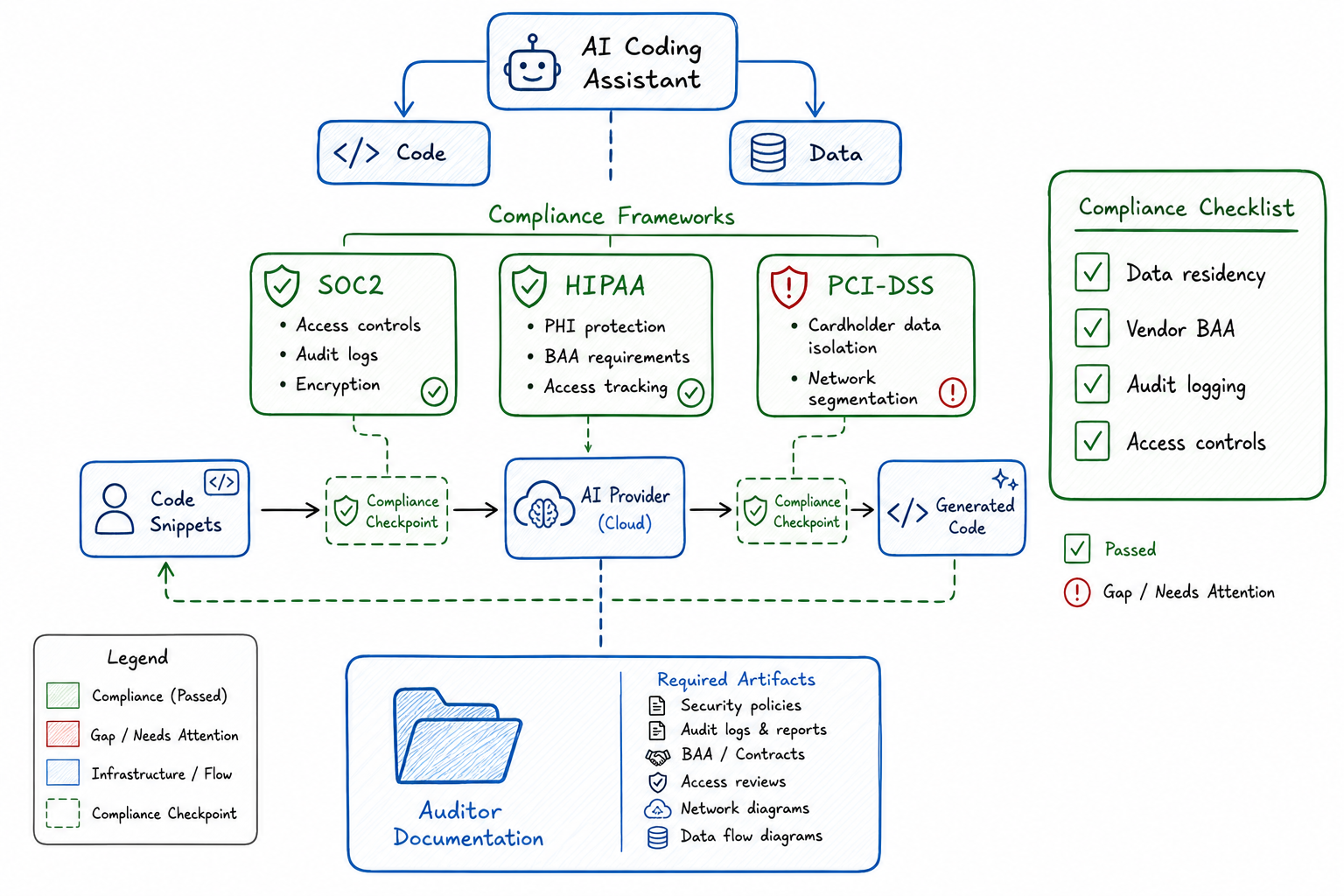
Compliance Considerations for AI Coding Assistants
When I introduced AI coding assistants to our engineering team last year, I expected pushback from security. What I didn’t anticipate was the three-month conversation with our compliance team that followed. As a platform engineer who’s spent the last decade working in regulated environments, I should have known better.
AI coding assistants are transformative tools. They’re also data processing systems that ingest, analyze, and sometimes retain code and context from your environment. If you’re operating under SOC2, HIPAA, PCI-DSS, or any other compliance framework, you need to understand what that means for your organization.
The Compliance Landscape for AI Tools
The regulatory environment hasn’t caught up with AI tooling, which creates both opportunity and risk. Most compliance frameworks were written before AI coding assistants existed, so there’s no checkbox that says “AI tools configured correctly.” Instead, you need to map AI tool behaviors to existing control requirements.
The key questions I ask when evaluating any AI coding tool:
- Where does my data go when I use this tool?
- How long is that data retained?
- Who has access to it, and under what circumstances?
- Is my data used to train models that other customers will use?
- What audit trails exist for data access and processing?
These questions matter because the answers determine whether you can use the tool at all in a regulated environment, and if so, under what constraints.
SOC2 Implications: Data Handling, Access Controls, Audit Logs
SOC2 is built around five trust service criteria: security, availability, processing integrity, confidentiality, and privacy. AI coding assistants touch nearly all of them.
Data Handling
When code flows through an AI assistant, you need to understand the data flow completely. I map it out like this:
Developer workstation → AI service → Model processing → Response
         ↓                  ↓              ↓
    Local context     API transit    Potential retention
For SOC2 purposes, I need to demonstrate that confidential information (which includes proprietary source code) is protected throughout this flow. That means:
- Encryption in transit: TLS 1.2+ for all API communications
- Encryption at rest: If the vendor retains any data, it must be encrypted
- Data classification: Code should be classified, and the AI tool should respect classification boundaries
Access Controls
SOC2 requires that access to systems and data is restricted to authorized individuals. With AI tools, this gets complicated:
- Who in your organization can use the tool?
- What repositories or codebases can the tool access?
- Can users configure the tool to access resources outside their authorization scope?
I implement access controls at multiple layers:
# Example access control matrix for AI coding tools
ai_tool_access:
  tier_1_unrestricted:
    - public_repositories
    - documentation
    - non_sensitive_internal_tools

  tier_2_restricted:
    - internal_services
    - non_production_data
    requires: security_training_complete

  tier_3_prohibited:
    - payment_processing_code
    - phi_handling_services
    - credentials_and_secrets
    requires: explicit_ciso_approval
Audit Logs
This is where many AI tool implementations fall short. SOC2 requires audit trails for access to sensitive systems. If your AI coding assistant is accessing code, you need logs that show:
- Who used the tool and when
- What code or context was sent to the AI service
- What responses were received
- Any data that was retained
Most enterprise AI tool vendors provide some level of audit logging, but the granularity varies significantly. I require vendors to provide logs that can answer: “Show me every interaction user X had with the AI tool involving repository Y during time period Z.”
HIPAA Considerations: PHI Exposure Risks with AI
If your organization handles Protected Health Information, AI coding assistants introduce risks that require careful management. The core HIPAA concern is simple: can PHI be exposed to the AI service, either intentionally or accidentally?
The Exposure Vectors
I’ve identified several ways PHI can leak into AI tool contexts:
- Hardcoded test data: Developers sometimes use real patient data in test fixtures
- Log samples: When debugging, developers paste log output that may contain PHI
- Database queries: SQL examples might reference actual patient identifiers
- Error messages: Stack traces can include PHI from application state
- Configuration files: Connection strings to PHI-containing databases
Technical Controls
My HIPAA-compliant AI tool deployment includes:
PHI Protection Checklist for AI Tools:
□ Pre-transmission scanning for PHI patterns
□ Blocked transmission of files matching PHI patterns
□ Sanitized context windows (no clipboard auto-inclusion)
□ Audit logging of all transmissions
□ BAA in place with AI tool vendor
□ Data retention set to minimum (ideally zero)
□ No model training on customer data
Business Associate Agreements
This is non-negotiable. If your AI tool vendor will have access to systems or data that could contain PHI, you need a Business Associate Agreement. Not all vendors will sign one, and that tells you something about whether you can use their tool in a HIPAA environment.
I maintain a tracking spreadsheet:
| Vendor | BAA Available | BAA Signed | PHI Exposure Risk | Approved Use |
|---|---|---|---|---|
| Vendor A | Yes | Yes | Low | All non-PHI code |
| Vendor B | No | N/A | Medium | Prohibited |
| Vendor C | Yes | Pending | Low | Pending approval |
PCI-DSS: Payment Data and AI Code Generation
PCI-DSS adds another layer of complexity because it has specific requirements about how cardholder data environments (CDEs) are segmented and who can access them.
Code in Scope
If developers are writing code that handles payment card data, that code is in scope for PCI-DSS. When that code flows through an AI assistant, you need to consider:
- Is the AI service provider included in your PCI scope?
- Does the AI tool meet PCI requirements for data protection?
- Are audit logs sufficient for PCI assessments?
My Approach
I segment AI tool usage based on code classification:
PCI Code Classification:
├── CDE Code (directly handles card data)
│   └── AI tools: PROHIBITED without explicit QSA approval
├── Connected Systems (communicate with CDE)
│   └── AI tools: RESTRICTED, requires security review
├── Supporting Systems (no card data access)
│   └── AI tools: PERMITTED with standard controls
└── Out of Scope
    └── AI tools: PERMITTED
For code that’s in or near the CDE, I recommend air-gapped development environments where AI tools simply can’t access the network.
Data Residency and Sovereignty Requirements
This is increasingly important as more jurisdictions enact data localization laws. When code flows through an AI service, you need to know:
- Where are the AI service’s processing endpoints located?
- Where is any retained data stored?
- Can you control data routing to specific regions?
Requirements by Region
| Region | Requirement | AI Tool Implication |
|---|---|---|
| EU (GDPR) | Data processor agreements, lawful basis | Requires DPA, may need EU-based processing |
| Germany | Often requires EU data residency | Must use EU endpoints |
| China | Data localization for certain categories | Likely requires domestic provider |
| Russia | Personal data localization | Domestic storage required |
| Brazil (LGPD) | Similar to GDPR | Requires appropriate agreements |
What I Ask Vendors
Data Residency Questionnaire:
1. Where are your API endpoints located geographically?
2. Can we restrict our traffic to specific regions?
3. Where is any retained data stored?
4. Do you use sub-processors, and if so, where are they located?
5. Can you provide data processing agreements compliant with GDPR?
6. How do you handle cross-border data transfers?
Vendor Assessment for AI Tool Providers
Before onboarding any AI coding assistant, I conduct a thorough vendor assessment. This isn’t optional in regulated environments—it’s required by most compliance frameworks.
Assessment Framework
Vendor Assessment Checklist:
□ Security
  □ SOC2 Type II report available and reviewed
  □ Penetration test results (within 12 months)
  □ Vulnerability management program documented
  □ Incident response plan exists
  □ Security certifications (ISO 27001, etc.)

□ Privacy
  □ Privacy policy reviewed
  □ Data processing agreement available
  □ Data retention policies documented
  □ Right to deletion supported
  □ No training on customer data (or opt-out available)

□ Compliance
  □ HIPAA BAA available (if needed)
  □ PCI attestation (if applicable)
  □ GDPR compliance documentation
  □ Data residency options documented

□ Operational
  □ SLA terms acceptable
  □ Support responsiveness verified
  □ Change management process documented
  □ Business continuity plan exists

□ Contractual
  □ Acceptable use policy reviewed
  □ Liability terms acceptable
  □ Termination rights clear
  □ Data portability on exit
Red Flags
I’ve learned to watch for certain warning signs:
- Vendor won’t share SOC2 report under NDA
- No clarity on data retention periods
- Vague answers about model training data sources
- No option for zero data retention
- Inability to provide audit logs
- Reluctance to sign BAAs or DPAs
Documentation Requirements for Auditors
When auditors ask about AI tools (and they will), you need documentation ready. I maintain a compliance package that includes:
Required Documentation
AI Tool Compliance Documentation Package:
├── Tool Inventory
│   ├── List of all approved AI tools
│   ├── Business justification for each
│   └── Risk assessment per tool
├── Policies
│   ├── AI tool acceptable use policy
│   ├── Data classification requirements
│   └── Prohibited use cases
├── Technical Controls
│   ├── Access control configuration
│   ├── Network controls and segmentation
│   └── Monitoring and alerting rules
├── Vendor Documentation
│   ├── SOC2 reports
│   ├── Signed agreements (BAA, DPA)
│   └── Security questionnaire responses
├── Audit Trails
│   ├── Access logs
│   ├── Usage logs
│   └── Configuration change logs
└── Training Records
    ├── Security awareness training
    └── AI tool-specific training completion
Audit Response Preparation
Before every audit, I prepare answers to these questions:
- What AI coding tools are in use?
- What data flows through these tools?
- How is sensitive data protected from AI tool exposure?
- What access controls limit who can use these tools?
- How are AI tool activities logged and monitored?
- What vendor due diligence was performed?
- How are AI tool configurations managed and secured?
Common Compliance Gaps with AI Tools
After working with several compliance teams and auditors, I’ve seen the same gaps repeatedly:
Gap 1: Incomplete Data Flow Mapping
Teams know they use AI tools but haven’t mapped exactly what data flows through them. This makes it impossible to demonstrate compliance.
Fix: Document every data flow, including context data that tools collect automatically.
Gap 2: Missing or Incomplete Agreements
Using AI tools without appropriate legal agreements (BAAs, DPAs) in place creates compliance violations.
Fix: No tool goes into production use without legal review and appropriate agreements.
Gap 3: Insufficient Access Controls
Everyone on the engineering team has access to AI tools, regardless of what code they’re working on.
Fix: Implement role-based access that considers code classification.
Gap 4: No Training or Awareness
Developers don’t understand compliance requirements or how their AI tool usage affects compliance.
Fix: Mandatory training before AI tool access is granted.
Gap 5: Inadequate Logging
AI tool usage isn’t logged, or logs aren’t retained long enough for audit purposes.
Fix: Implement comprehensive logging with appropriate retention periods.
Gap 6: Shadow AI
Developers use unauthorized AI tools because approved options are too restrictive.
Fix: Provide approved tools that meet developer needs while maintaining compliance.
Building a Compliance Checklist for AI Adoption
Here’s the comprehensive checklist I use when adopting new AI coding tools:
AI Coding Tool Adoption Compliance Checklist

PRE-ADOPTION
□ Business case documented
□ Tool evaluated against alternatives
□ Security assessment completed
□ Privacy impact assessment completed
□ Vendor assessment completed
□ Legal review of terms of service
□ Appropriate agreements executed (BAA/DPA)
□ Risk acceptance documented for residual risks

TECHNICAL IMPLEMENTATION
□ Network controls configured
□ Access controls implemented
□ Authentication integrated (SSO/MFA)
□ Audit logging enabled
□ Data loss prevention rules configured
□ Monitoring and alerting configured
□ Backup and recovery tested (if applicable)

POLICY AND PROCEDURE
□ Acceptable use policy updated
□ Data classification requirements documented
□ Prohibited use cases defined
□ Incident response procedures updated
□ Change management procedures updated

TRAINING AND AWARENESS
□ Security team trained on tool
□ Compliance team briefed
□ Developer training materials created
□ Mandatory training requirement established
□ Training completion tracking implemented

ONGOING COMPLIANCE
□ Periodic access review scheduled
□ Vendor reassessment schedule established
□ Audit log review process defined
□ Compliance monitoring metrics defined
□ Annual policy review scheduled
Working with Compliance Teams on AI Initiatives
The relationship between engineering and compliance often feels adversarial, but it doesn’t have to be. Here’s how I’ve learned to work effectively with compliance teams on AI initiatives:
Start Early
Don’t surprise compliance with a fait accompli. I involve them in AI tool evaluations from the beginning, not after we’ve already committed to a vendor.
Speak Their Language
Frame discussions in terms of controls, risks, and evidence—not features and productivity gains. When I explain why we need an AI tool, I also explain how we’ll maintain compliance.
Provide Solutions, Not Just Problems
Instead of saying “we need to use this AI tool,” I present a complete package: the tool, the risks, and the controls we’ll implement to mitigate those risks.
Build Trust Incrementally
Start with low-risk use cases and demonstrate compliance success before expanding to higher-risk scenarios. I started our AI tool adoption with public documentation and non-sensitive internal tools before moving to proprietary code.
Document Everything
Compliance teams live in a world of evidence and documentation. Make their job easier by proactively documenting decisions, controls, and evidence.
Establish Regular Communication
I have a standing monthly meeting with our compliance lead specifically to discuss AI tools. This prevents surprises and builds mutual understanding.
Conclusion
AI coding assistants are powerful tools that can significantly improve developer productivity. But in regulated environments, adoption requires careful planning and ongoing compliance management.
The good news is that compliance and AI tool adoption aren’t mutually exclusive. With proper controls, documentation, and vendor management, you can leverage AI coding assistants while maintaining your compliance posture.
The key is treating AI tools like any other third-party system that processes your data: understand the risks, implement appropriate controls, maintain documentation, and monitor continuously. It’s more work than just enabling a tool and hoping for the best, but it’s the only sustainable approach in a regulated environment.
Start with the checklists in this post, adapt them to your specific compliance requirements, and involve your compliance team early. The investment in proper setup pays dividends when audit season arrives.