AI Apparatus: An Open Marketplace for AI Agent Skills and MCP Servers
Introducing ai-apparatus, a fork-friendly marketplace for sharing IDE skills and MCP servers across Cursor, Claude, VS Code, and other AI coding agents.
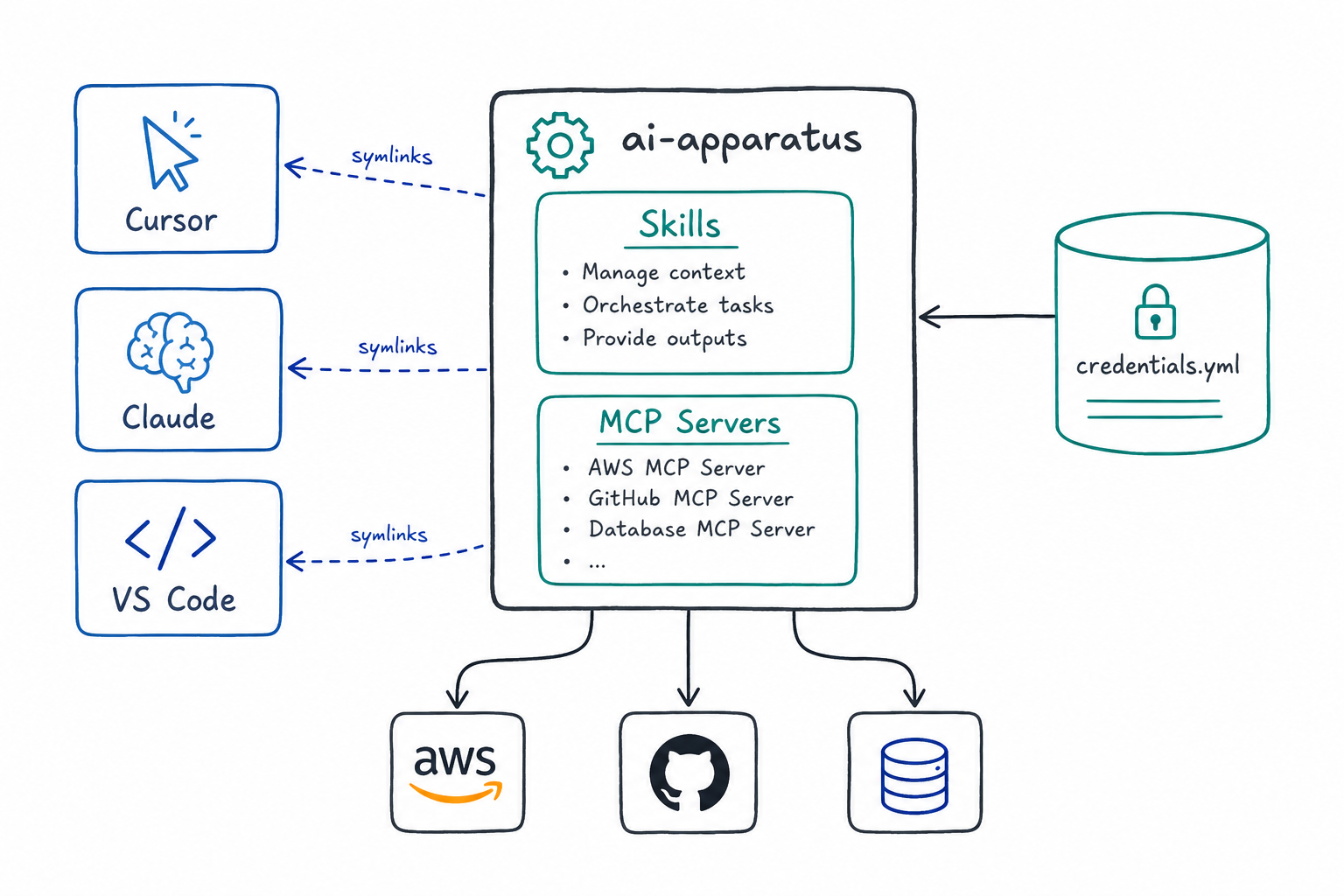
As AI coding assistants become central to development workflows, teams face a new challenge: how do you share and maintain agent configurations across developers, tools, and projects? ai-apparatus is my answer — an open, opinionated marketplace for distributing skills (portable agent instructions) and MCP servers (external tool integrations) that works across Cursor, Claude, VS Code, and other AI agents.
The Problem
Every AI coding agent has its own way of handling custom instructions, tools, and integrations:
- Cursor uses skills directories and MCP configs
- Claude Desktop/Code has its own config locations
- VS Code with Copilot expects yet another layout
When you’re on a platform team trying to standardize AI-assisted workflows, this fragmentation creates friction. Developers end up with inconsistent setups, outdated instructions, and no easy way to share improvements.
How ai-apparatus Works
The core idea is simple: symlinks + a single source of truth.
1. Clone the repo to ~/.local/share/ai-apparatus
2. Run the install script
3. Skills and rules are symlinked into your agent's expected paths
4. MCP server configs are merged into your agent's MCP JSON
Because skills are symlinks (not copies), any update to the repo is immediately reflected. On Cursor, a session hook automatically pulls updates on every new agent session — no manual intervention required.
Multi-Agent Support
Set AI_APPARATUS_AGENT before installing to target your preferred tool:
| Agent | Skills Location | MCP Config |
|---|---|---|
cursor (default) | ~/.cursor/skills | ~/.cursor/mcp.json |
claude-desktop | ~/.config/ai-apparatus/skills | Claude’s config path |
claude-code | ~/.claude/skills | ~/.claude.json |
vscode / copilot | ~/.config/ai-apparatus/skills | VS Code’s MCP path |
generic | ~/.config/ai-apparatus/skills | Neutral layout |
This means you can use the same skill definitions across different AI agents without rewriting them for each tool.
Skills: Portable Agent Instructions
Skills are markdown files (SKILL.md) that provide context and instructions to your AI agent. They follow a consistent format:
---
name: create-pr
description: Create GitHub PRs with conventional commit formatting
---

# Create PR

## Instructions
Step-by-step guidance for the agent...
The frontmatter tells the agent when to invoke the skill. The body contains the actual instructions. Because they’re plain markdown, they’re:
- Readable — anyone can understand what the skill does
- Portable — works across different AI agents
- Version-controlled — track changes like any other code
Skill Distribution
branch from main
    │
    ▼
add skill under marketplace/beta/skills/
    │
    ▼
test locally via symlink
    │
    ▼
open PR → merge to main
    │
    ▼
team gets it automatically on next session
    │
    ▼
promote beta → stable when validated
MCP Servers: Opt-In Tool Integrations
MCP (Model Context Protocol) servers give your AI agent access to external tools — AWS services, GitHub, databases, browser automation, and more. Unlike skills, MCP servers are opt-in because they run background processes.
Available Servers
| Server | What it does |
|---|---|
aws-api | AWS service access via credential chain |
github | GitHub API integration |
playwright | Browser automation |
mongodb | Database queries |
atlassian | Jira/Confluence access |
context7 | Documentation search |
Credential Management
Instead of manually editing JSON configs with tokens, add credentials once to ~/.config/ai-apparatus/credentials.yml:
github_pat: "ghp_xxxxxxxxxxxx"
atlassian_email: "you@company.com"
atlassian_token: "ATATT3xxxxxxxxx"

aws:
  default_region: ca-central-1
  profiles:
    - name: dev
      profile: dev-super
      region: ca-central-1
The install script injects these into your MCP config automatically. When you rotate a token, update the YAML and run install.sh update — credentials propagate to all your MCP servers.
Auto-Sync with Session Hooks
On Cursor, the install creates a session hook that runs on every new agent session:
{
  "hooks": {
    "sessionStart": [{
      "command": "bash -c '\"$HOME/.local/share/ai-apparatus/scripts/install.sh\" update'"
    }]
  }
}
This hook:
- Pulls the latest from
main - Symlinks any new skills
- Refreshes MCP server configs
- Re-injects credentials from the YAML store
Your team pushes a new skill to the repo; everyone gets it on their next session without lifting a finger.
Platform Engineering Perspective
This project reflects my broader philosophy on golden paths for AI-assisted work:
- Scoped access — MCP servers are opt-in, credentials are centralized
- Auditable — everything is version-controlled, changes go through PRs
- Portable — same skills work across different AI agents
- Self-updating — session hooks keep configurations in sync
As AI agents become more capable, platform teams need to provide guardrails that enable productivity without sacrificing control. ai-apparatus is one piece of that puzzle.
Getting Started
# Clone the repo
git clone https://github.com/gs-init/ai-apparatus.git ~/.local/share/ai-apparatus

# Install (defaults to Cursor)
~/.local/share/ai-apparatus/scripts/install.sh install

# Or target a different agent
export AI_APPARATUS_AGENT=claude-code
~/.local/share/ai-apparatus/scripts/install.sh install
Fork it, strip skills you don’t need, add your own, and wire in your team’s credentials file. The repo is designed to be customized for your organization’s workflows.
What’s Next
The current focus is on:
- More skills for common development workflows
- Additional MCP server integrations
- Better documentation for creating custom skills
- Cross-IDE testing and validation
Contributions welcome — open a PR or file an issue on GitHub.
Repository: github.com/gs-init/ai-apparatus